

An AI chatbot can answer a customer in seconds—and still give them the wrong answer. The useful question is not whether a platform calls its chatbot “AI-powered.” It is whether the tool can answer from reliable information, hand off complicated requests to a person, and fit your budget as conversations increase.
AI-powered chatbot platforms range from simple website bots to full customer-service systems connected to help desks, messaging channels, and business data. Some are quick to set up without code; others give developers more control over integrations and workflows. Here is what to compare before you choose.
Why AI-Powered Chatbot Platforms Matter in 2026
Customers expect quick answers, but many businesses cannot staff support around the clock. An AI chatbot can respond to common questions, collect details before a human takes over, and help support teams handle routine work. It can also make it easier for a small business to offer basic support outside business hours.
The market has moved beyond scripted “choose an option” bots. Platforms now use AI to understand natural-language questions, draw answers from support content, connect to other software, and escalate a conversation when they cannot help. For instance, Tidio says its Lyro chatbot uses a business’s support content and hands a conversation to a human when it cannot answer.tidio
That capability does not make every platform a fit for every business. A store with a small FAQ may need a lightweight chatbot. A company managing tickets across several channels may need a help desk with AI features, routing, reporting, and human-agent collaboration.
The main shift to notice is how platforms charge. One may bill per agent seat, another by conversations or message credits, and another by successful AI resolutions. A low entry price can become expensive if you overlook usage fees, seat costs, add-ons, or the limits on a free plan.
The Honest Truth About AI Chatbots
An AI chatbot is not automatically accurate just because it uses a large language model. If its knowledge base is incomplete, out of date, or poorly organized, it can give confident but incorrect answers. You need to check what information it uses and what it does when that information is missing.
Here is what most comparison pages will not tell you: platform pricing is hard to compare unless you know your likely usage. “$40 per month” may include a limited number of message credits, while another vendor charges for each successful resolution and also requires a paid help-desk plan. The billing unit matters as much as the headline price.
AI chatbots also do not eliminate the need for human support. They work best on recurring questions with clear, approved answers. Refund disputes, unusual account problems, sensitive complaints, and requests involving judgment should have a clear path to a person.
A practical evaluation should test the real questions customers ask—not only the polished demo. The best platform is the one that handles your common requests reliably, makes it easy to review failures, and keeps the total cost predictable.
Best AI-Powered Chatbot Platforms to Consider
There is no single best platform for every business. These options cover different needs, from a quick website chatbot to a more customizable customer-support agent.
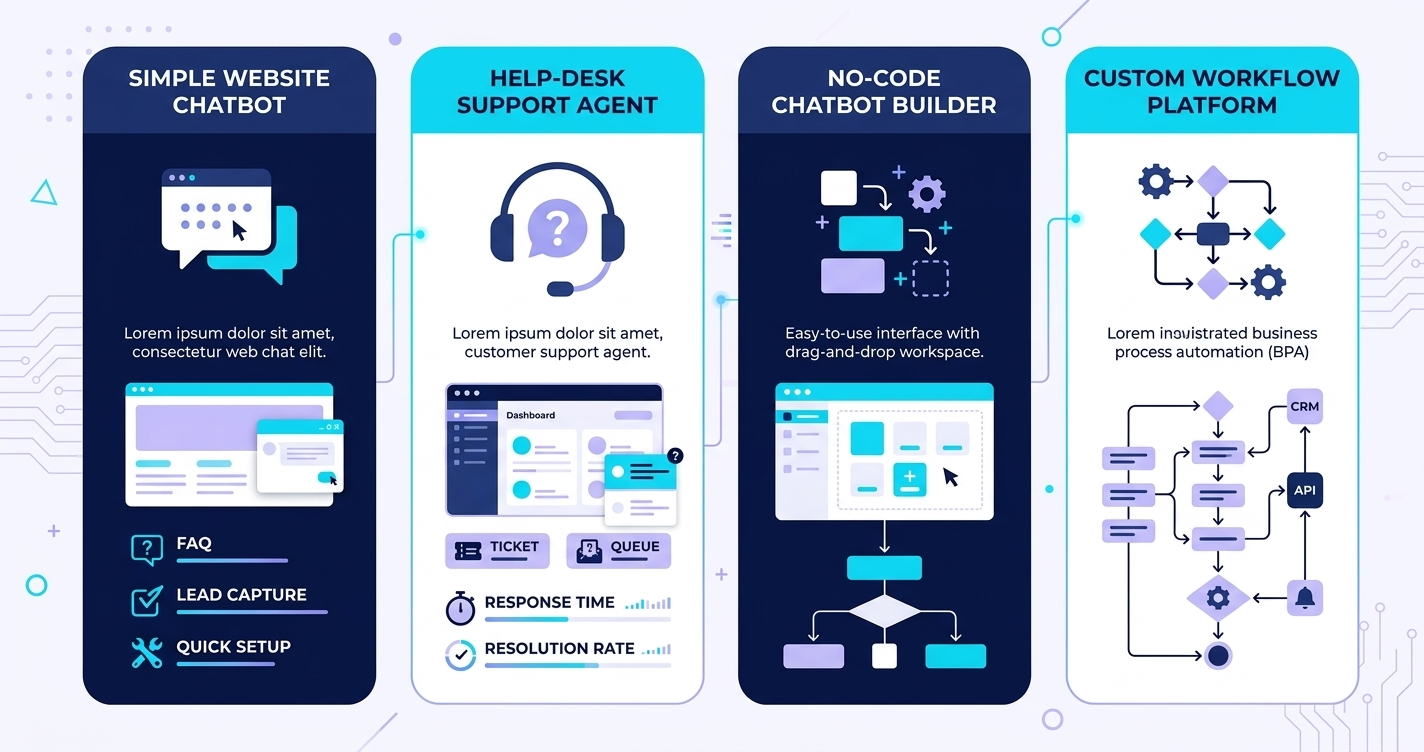
| Platform | Best suited for | Pricing model shown on official pricing page | Notable fit |
|---|---|---|---|
| Tidio Lyro | Small businesses seeking AI support with a live-chat option | Free entry with 50 Lyro conversations; paid AI plan listed from $39/month, with conversation limits and higher tiers | Customer support based on your support content, with human handoff |
| Chatbase | Teams that want to create a chatbot from their own information | Free plan with 50 message credits/month; Hobby $40/month, Standard $150/month, Pro $500/month | Message-credit tiers, integrations, API access on Standard and above |
| Botpress | Teams needing more control, custom workflows, or multiple agents | Free plan with 100 conversations; Plus $150/month and Team $750/month when billed annually | Visual building, multiple agents, conversation-based billing |
| Zendesk AI agents | Organizations already using Zendesk for customer service | AI agents included in Suite and Support plans, with usage priced by successful outcomes | Help-desk-connected support and tiered AI resolutions |
| Intercom Fin | Teams using Intercom or a compatible help desk | Fin billed at $0.99 per successful outcome; seat-plan costs may also apply in Intercom | AI resolution pricing and customer-service workflows |
Pricing and inclusions can change. Confirm the current plan, billing period, regional availability, usage limits, and any required base subscription on each vendor’s pricing page before you buy. Tidio’s official page lists a free option with 50 Lyro conversations and a Lyro AI plan from $39/month; its higher-tier pricing and included limits vary by plan. Chatbase lists Free, Hobby at $40/month, Standard at $150/month, and Pro at $500/month, with different monthly message-credit allowances. Botpress lists Free, Plus at $150/month billed annually, and Team at $750/month billed annually, with monthly conversation limits. Zendesk says its AI agents are included in Suite and Support plans, with charges based on successful outcomes. Intercom’s pricing information lists Fin at $0.99 per outcome, alongside seat-based plan pricing.zendesk+5
Tidio Lyro: A Simpler Customer-Support Starting Point
Tidio Lyro is worth considering if you want an AI chatbot for common support questions and a path to human help. The platform says Lyro uses information from your support content and transfers a conversation to a human when it cannot answer. Its official pricing page shows a free entry option with 50 conversations and a paid Lyro plan listed at $39/month, with conversation-limit choices and higher business plans.tidio
A practical setup is to collect your approved FAQs, shipping and return policies, product details, and other support documents. Add them as the bot’s reference material, then test questions that customers actually ask. Check how it handles missing information and whether the handoff preserves the conversation for your support team.
| Experience level | Realistic monthly income impact | Likely timeline |
|---|---|---|
| Beginner business owner | $0–$100 in direct savings or recovered sales | 2–4 weeks to test and tune |
| Growing small business | $100–$600 in time saved or support capacity | 1–3 months |
| Larger team | $600+ potential operational value, depending on volume | 2–6 months for careful rollout |
These are illustrative business-value ranges, not earnings promised by Tidio. Actual results depend on support volume, accuracy, staffing costs, and how many conversations the bot resolves successfully.
The honest caveat: a limited conversation allowance may work for a trial but not for a busy site. Estimate the number of eligible conversations first and test what counts as a billable interaction.
Chatbase: Build a Bot Around Your Information
Chatbase is designed for creating customer-facing AI agents using company information. Its pricing page lists 50 monthly message credits on Free, 700 on Hobby for $40/month, 4,000 on Standard for $150/month, and 15,000 on Pro for $500/month. It also lists API access on Standard and above, while extra agents and branding removal are paid add-ons.chatbase
This can suit a small team that wants to launch a focused FAQ bot without building a custom application. You can start with a small set of documents or website content, then add integrations as your requirements grow. Before choosing a tier, look at how the platform counts message credits and whether your expected traffic fits the included allowance.
A sensible test involves questions with known answers, questions whose answers are absent from the source content, and questions that should be sent to a human. Do not only test the bot’s best-case path.
| Experience level | Realistic monthly income impact | Likely timeline |
|---|---|---|
| Beginner | $0–$100 from time saved or improved lead capture | 1–3 weeks |
| Intermediate operator | $100–$700 through support efficiency or client setup work | 1–3 months |
| Advanced builder | $700+ when packaged into a supported client service | 3–6 months |
These are not Chatbase earnings claims. They represent possible outcomes when the platform supports a useful business process and someone can sell or operate that service.
The honest caveat: message credits are not the same as conversations. A long exchange may consume more credits than a short one, so test representative customer chats and monitor usage during a trial.
Botpress: More Control for Custom Workflows
Botpress may fit businesses that want to customize chatbot behavior, connect tools, or build multiple agents. Its official pricing page lists a Free plan with 100 conversations, Plus at $150 per month billed annually with 250 conversations per month, and Team at $750 per month billed annually with 1,500 conversations per month. The page also lists conversation packs for usage beyond included limits and different seat allowances by plan.botpress
The platform offers more room to shape the bot than a simple FAQ widget. That flexibility can help when the chatbot needs to follow a workflow—for example, ask clarifying questions, categorize a support request, look up approved information, and direct the user to the right next step.
But customization adds work. You need to plan the flow, connect the right sources, test edge cases, set access rules, and maintain the system as your business changes. If all you need is a basic FAQ bot, a more configurable platform may be more than you need.
| Experience level | Realistic monthly income impact | Likely timeline |
|---|---|---|
| Beginner | $0–$150 in efficiency value while learning | 2–6 weeks |
| Intermediate builder | $150–$1,000 through implementation or workflow work | 1–4 months |
| Advanced consultant | $1,000+ if you build and maintain solutions for clients | 3–6 months |
These estimates reflect possible service or productivity value, not guaranteed platform revenue. A developer or consultant must account for setup, testing, support, and maintenance.
The honest caveat: Botpress’s paid plans have higher starting prices than lightweight chatbot options. Make sure you need its flexibility before paying for it.
Zendesk AI Agents: Consider Them Alongside Your Help Desk
Zendesk AI agents are most relevant if your support operation already uses Zendesk or needs a full ticketing and support system. Zendesk says its AI agents are included in Suite and Support plans, with pricing tied to successful outcomes and a plan-based resolution allowance.zendesk+1
That can make the platform useful for teams that need customer-service operations around the bot—not only a chat window. Think ticket handling, support queues, escalation rules, and shared visibility for human agents. The tradeoff is that you should assess the full Zendesk subscription and expected AI usage, rather than comparing only the bot’s cost.
Before rollout, agree internally on what your team will count as a successful resolution, what requires a human, and how you will audit conversations. Track both automated resolutions and repeat contacts; an answer that ends the chat but fails to solve the issue is not a good customer outcome.
The honest caveat: outcome-based charges can make budgeting less straightforward if usage varies month to month. Ask for a cost estimate based on your projected volume and clarify how the platform defines and bills outcomes.
Intercom Fin: Outcome-Based AI for Support
Intercom Fin is worth considering if you need an AI customer-service agent and want charges tied to successful outcomes. Intercom’s pricing information lists Fin at $0.99 per outcome; its seat-based plans can add a separate cost if you use Fin within the Intercom platform.intercom+1
That pricing model can align the fee with resolved issues, but you need to define your expected number of successful resolutions and include any required software seats in the total. Intercom provides a pricing calculator to estimate costs based on team size and expected Fin outcomes.intercom
Test what Fin answers correctly, whether customers can reach a person, and what happens when it cannot resolve the request. A “successful outcome” metric is useful, but it should not replace your own review of customer satisfaction and repeat contacts.
The honest caveat: a per-outcome price is not necessarily the full bill. Include seat costs, other software requirements, and the expected monthly resolution volume before comparing it with alternatives.
How to Choose an AI Chatbot Platform
Start by deciding what job you need the chatbot to do. “Improve customer service” is too broad to guide a purchase. “Answer order-status questions using approved data and transfer delayed orders to an agent” gives you something you can test.
- Write down the top 10–20 questions customers ask.
- Mark which questions have a clear, approved answer and which need human judgment.
- Estimate monthly conversation or message volume.
- List the channels and software the chatbot must connect to.
- Identify sensitive data the platform must never access.
- Test each finalist with real questions, including questions it should not answer.
- Calculate the total price, including seats, usage, add-ons, and annual billing.
- Start with a limited rollout and review incorrect answers before expanding.
Use the same set of test questions on each platform. Score answer accuracy, source traceability, handoff quality, ease of updating content, analytics, and total estimated cost. That makes the decision more reliable than choosing based on a demo or a feature checklist.
For additional context on AI tools your team might use alongside support software, see Eblowee’s best AI tools for freelancers and best AI tools for content creators.
The Mistakes That Keep Most People From Choosing the Right Chatbot
The first mistake is choosing a platform because it has a free plan. Free tiers are useful for testing, but they may limit messages, conversations, seats, integrations, data sources, or branding. Test the limits against your actual usage before assuming the free option can support your business.
The second mistake is comparing prices without comparing billing units. A price per seat, a price per message credit, a price per conversation, and a price per successful outcome measure different things. Estimate your own monthly usage and compare total cost—not just the number in the pricing headline.
The third mistake is uploading outdated or contradictory support information. A chatbot cannot reliably answer from a policy that is unclear or incorrect. Review your content first, remove duplicate documents, and assign someone to keep the source material current.
The fourth mistake is letting the bot handle every issue. Customers need a clear route to a human when the question is unusual, urgent, sensitive, or unresolved. A good handoff should preserve the conversation so customers do not have to explain the same problem twice.
The fifth mistake is skipping ongoing review. Customer questions change, products change, and policies change. Check conversation samples regularly, track failed or corrected answers, and update the knowledge base when the chatbot repeatedly misses an important question.
The Fastest Path to the Right Platform
Starting from zero: Write down your most common customer questions and test a free or low-cost platform with a small, non-sensitive set of information. Keep the bot in a limited pilot, review every answer, and expand only when it handles the common questions consistently.
You already have a support team or customer audience: Choose a platform that works with your existing help desk and gives human agents clear visibility into the chatbot’s conversations. Compare the seat and usage charges together, then pilot it on one low-risk question category.
You want to build chatbots as a service: Learn how to structure a client’s knowledge base, design safe escalation rules, measure answer quality, and support the bot after launch. Pair that skill with the business ideas in our guide to making money with AI tools, but sell a defined result—not a promise of “fully automated support.”
What Comes Next
AI-powered chatbot platforms are moving from simple question-and-answer widgets toward systems that can use business data, connect to support tools, and complete limited customer-service tasks. That makes integrations, permissions, handoffs, and measurement more important—not less.
For a small business, the best first use is usually a controlled one: answer recurring questions from approved content, collect context, and route unresolved cases to a person. If the bot cannot reliably handle that job, adding more autonomy will not fix the underlying problem.
Choose based on your support process, expected usage, and required integrations. Run a real test before committing, and review the full bill before scaling.
The window to build faster, more consistent customer support is open right now — but it is not going to stay open forever.
One chatbot. Thirty days. That is the formula.